
A private alternative to ChatGPT, on your Mac.
Chat with a free model that runs on your own Mac, where a chat never reaches our servers. When you want a bigger model, Private Cloud is $19 a month and sealed end to end.
Download for Mac Free and paid, side by side → Free · 9.7 MB, then a one-time model download of 2 to 9 GB macOS 14 or later · Apple silicon (M1 or newer) · No account · Signed and notarized by AppleSistineGPT is a Mac app. Send yourself the link, then open it on your Mac.
Email this link to yourselfYour mail app opens with the link in it; add your own address. It needs a Mac with macOS 14 or later and Apple silicon.
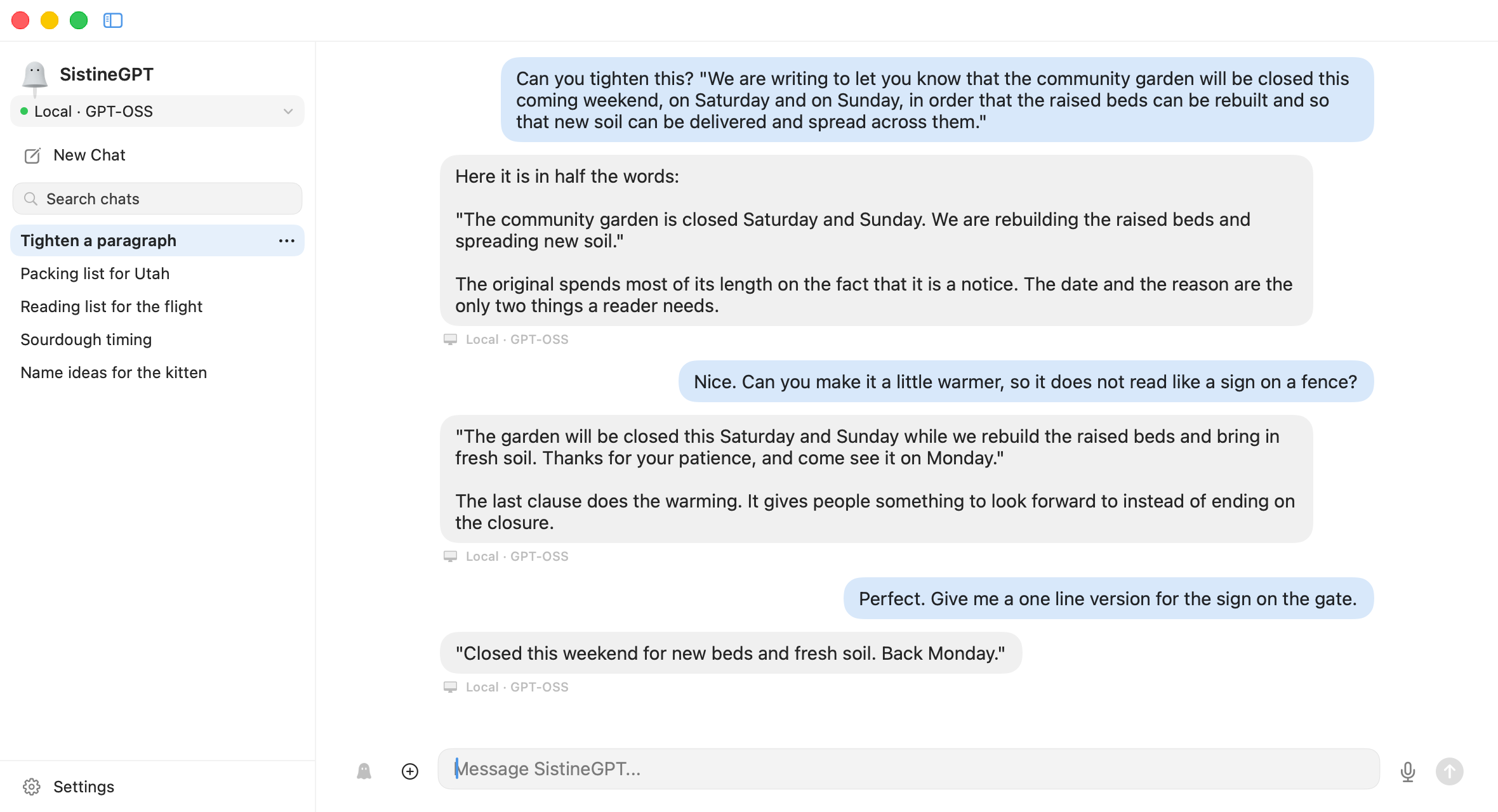 Tightening a notice with GPT-OSS, a free model you can add later. The one-click setup picks one sized to your Mac: Qwen 2.5 with 16 GB of memory or more, a smaller, simpler model with 8 GB. The label under each reply says where it ran.
After you click Download
- 1InstallOpen the downloaded file and drag SistineGPT to Applications.
- 2Set up the free modelOpen SistineGPT and click Set Up Free Local AI. It downloads a model sized to your Mac, 2 to 9 GB once, and Ollama, the small free program that runs it.
- 3ChatNo account and no sign-up. Once the model is set up, it works with no internet connection.
You choose where each answer is made.
One menu at the top of the sidebar picks it for the whole app, and every reply is labeled with where it actually ran.
-
Local · Qwen 2.5
Free, on your Mac
One click sets up a free model sized to your Mac's memory. A chat with it never reaches our servers, and once the model is set up it works with no internet connection.
You can also pick another free model, or use one running on another Mac on your network.
-
Private cloud · GLM 5.3 Flash
Private Cloud, for harder questions
On the $19 plan, Private cloud mode sends your message to a bigger model in the cloud. Your Mac checks the server first, then locks each message so only that server can open it. We can't read it on the way.
Private cloud mode reads text only: it can't see images, search the web or use your memory notes.
-
 Ghost mode
Ghost mode, like a private window
The ghost button on the message box. With it on, a chat is written to no file on your Mac and reads no memory notes. Leave it and it is gone, unless you choose to keep it.
It works with a model on your Mac and in the cloud alike.
Free, or $19 a month.
Free is the product, not a trial. Pay only if you want a bigger model than your Mac can run, for long writing and the hard questions your Mac's model gets wrong.
- Unlimited chats with the model on your Mac
- Those chats never reach our servers
- Works with no internet once the model is set up
- Ghost mode, memory notes, voice input and attachments
- 40 web searches a day
- Everything in Free
- A bigger model in the cloud, in Private cloud mode
- Your Mac locks each message so only the sealed server can open it
- A monthly allowance; if you reach it, replies come from the model on your Mac until the month turns, and nothing more is charged
- Private cloud mode reads text only: no images, no web search
- Cancel any time; ask within 14 days and you get a refund
How to upgrade. Download the app, open Settings → Plan and choose Select beside Private Cloud. Paddle, our merchant of record, takes the payment in your browser and adds any sales tax; the app never sees your card. Cancel any time from the same tab, and you keep the plan to the end of the month you paid for. Ask within 14 days of a charge and you get a refund (refund policy).
Questions before you download
Is it really private?
With the model on your Mac, a chat is saved only on your Mac, encrypted with a key kept in your Keychain, and never reaches our servers. The one thing that leaves is a web search, as words, after you allow it. In Private cloud mode your Mac checks that the server is genuine sealed hardware and locks each message to it, so our relay passes along a message it has no key to open. It does not check every program the server's operator runs. So your words are kept from us and from everyone on the way, and on the server itself you rely on its sealed hardware. For anything you would not trust to any cloud, use the free model on your Mac. The Proof page shows how to check each claim yourself.
Which models does it use?
On your Mac, one click sets up a free model sized to its memory, a one-time download of about 2 to 9 GB: Qwen 2.5 on a Mac with 16 GB or more, and a smaller, simpler model on a Mac with 8 GB, so SistineGPT is at its best with 16 GB. You can add other free models, such as GPT-OSS in the picture above, or use one running on another Mac on your network. Private Cloud runs a bigger model, GLM 5.3 Flash, on a sealed server.
Does it need the internet?
Only to download the app and, once, the model. After that, chats with the model on your Mac work with no connection at all. Web search and Private Cloud need a connection.
What does $19 a month get me?
Private Cloud: a bigger model than most Macs can run, for long writing and hard questions, with each message locked so only the sealed server can open it. It comes with a monthly allowance. If you reach it, replies come from the model on your Mac until the month turns, so nothing stops working and nothing more is charged. You buy it inside the app, under Settings → Plan.
What happens to my chats?
They stay on your Mac, encrypted there, and you choose how long they are kept. A Ghost chat is saved nowhere. Settings → Privacy deletes everything SistineGPT saved on your Mac and destroys the key. Touch ID can lock the app, too.
Does it run on an Intel Mac?
No. SistineGPT needs a Mac with Apple silicon (M1 or newer) and macOS 14 Sonoma or later. To check, open the Apple menu and choose About This Mac: the Chip line starts with Apple M.
Do I need an account?
Not for the free app: no email, no sign-up. If you buy Private Cloud, Paddle asks for the email and card it needs to bill you, and we receive from Paddle that you subscribed and to which plan, never your card.
Can I stop paying and keep using it?
Yes. Cancel in Settings → Plan and you keep Private Cloud to the end of the month you paid for, then the app goes on working with the free model on your Mac.
The fine print is short: the privacy policy (what stays on your Mac, what leaves it, and every company that receives anything), the Proof page (which claims you can check yourself, and how) and the documentation.
Try it on your Mac.
Free, with no account. Upgrade inside the app only if you want a bigger model.
Download for Mac 9.7 MB, then a one-time model download of 2 to 9 GB · macOS 14 or later · Apple silicon (M1 or newer) · Signed and notarized by AppleOn your phone? Send yourself the link, then open it on your Mac.
Email this link to yourselfPrices are shown before tax, which Paddle adds at checkout. Paddle sells the subscription as our merchant of record.